
What is SSL Certificate and Why Do We Need It?

WHAT IS SSL CERTIFICATE AND WHY DO WE NEED IT?
Table of Contents
Table of Contents

If you’ve ever clicked on a website and noticed that tiny “Not Secure” warning in the browser bar, you probably paused for a second. Maybe you even left the site. That reaction right there is why SSL certificates matter. But let’s slow down. Before we jump into the why, let’s unpack the what. So… what is SSL certificate anyway, and why is it such a big deal in 2024?
What is an SSL Certificate?

What is an SSL Certificate?

SSL stands for Secure Sockets Layer. At its core, an SSL certificate is a digital file that acts like a security badge for a website. It tells browsers (like Chrome, Safari, or Firefox) and users (like you and me) that the site is safe to use.

Imagine you’re shopping online. You type in your credit card details and hit “pay.” Without SSL, that information travels across the internet in plain text, almost like shouting your secrets in a crowded room.

Anyone listening could steal it. Scary, right? But when a website has an SSL certificate, all that data is encrypted—turned into unreadable code—so even if someone intercepts it, they can’t make sense of it.

Here’s what SSL really does in simple terms:

  • Encrypts information: Any data sent between you and the website is locked up, keeping things like passwords, personal details, or card numbers private.
  • Confirms identity: SSL certificates prove that the website is actually who it says it is, not a fake site pretending to be your bank or favorite store.
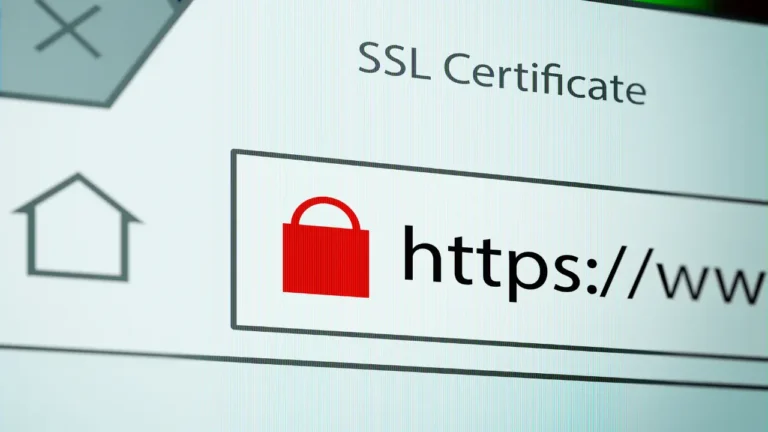
  • Shows trust signals: That little padlock icon in the browser bar? That’s SSL at work. It’s your visual cue that the site is secure.

And you’ve probably noticed websites starting with either http:// or https://. The “S” in HTTPS stands for “Secure,” and it only shows up if the site has SSL.

So to put it in everyday words: an SSL certificate is like a lock and key for the internet. It locks up sensitive info while it moves around and makes sure you’re dealing with the real website, not an imposter.
Why Do We Need an SSL Certificate?

Why Do We Need an SSL Certificate?

The short answer? Because the internet isn’t as safe as it looks. Every time you enter your name, password, or payment details on a website, that information travels through different networks before reaching its destination. Without protection, it’s like sending a postcard—anyone who handles it on the way can read what’s written. That’s exactly why we need an SSL certificate.

Here are the main reasons it matters:

  1. Protects sensitive information
    SSL keeps data private by encrypting it. For example, when you buy something online, your credit card info doesn’t just float around in plain text—it’s scrambled into unreadable code. Even if hackers intercept it, it’s useless gibberish to them.
  2. Builds trust with visitors
    Let’s be honest, would you shop on a website that flashes a “Not Secure” warning at the top? Probably not. People want to know the site they’re on takes their safety seriously. That padlock symbol in the browser reassures them instantly.
  3. Stops imposters and phishing
    Cybercriminals sometimes create fake versions of popular sites to trick people into sharing personal data. An SSL certificate helps verify that a website is real and not a lookalike scam.
  4. Improves SEO and rankings
    Google has openly said it prefers secure sites. If two websites are equal in content and authority, the one with SSL (HTTPS) gets a little ranking boost. It may not be the magic bullet for SEO, but it definitely helps.
  5. Professional credibility
    In today’s digital world, running a site without SSL just looks outdated. Whether you’re a blogger, a business owner, or an online store, having SSL says you’re professional and trustworthy.

So in plain English: we need an SSL certificate because it protects data, builds trust, and even helps with Ranking on Google. Without it, you’re not just risking your visitors’ safety—you’re also risking your own reputation.
How Does SSL Affect SEO and Google Rankings?

How Does SSL Affect SEO and Google Rankings?

Here’s the thing: Google wants users to feel safe online. Back in 2014, Google officially announced that websites using HTTPS (secured with an SSL certificate) would get a small ranking boost compared to those still stuck on plain old HTTP.

But let’s clear this up—SSL alone won’t push your site from page 10 to page 1 overnight. SEO is like a big puzzle, and SSL is just one piece of it. However, it’s an important piece because:

  1. Google favors security
    When two websites are similar in content and authority, the one with SSL (HTTPS) usually gets a ranking edge. Google doesn’t want to send users to a site that might expose their data.
  2. Better user experience = lower bounce rates
    Imagine landing on a site and immediately seeing “Not Secure” in the browser bar. Most people hit the back button. When users leave quickly, it signals to Google that the site might not be trustworthy, which can hurt rankings. With SSL, visitors are more likely to stick around.
  3. Trust boosts conversions (indirect SEO win)
    SSL makes users feel comfortable filling out forms, subscribing, or making purchases. The more interactions and positive signals your site gets, the more search engines see it as valuable.
  4. Future-proofing
    As the web evolves, Google keeps tightening security requirements. Having SSL now ensures you’re aligned with their long-term vision of a safer internet.

In short: SSL is a trust signal for both users and Google. Without it, you risk scaring off visitors and slipping down the search rankings.


Also Read:  Does Changing a Domain Name Affect SEO? 
Types of SSL Certificates Explained

Types of SSL Certificates

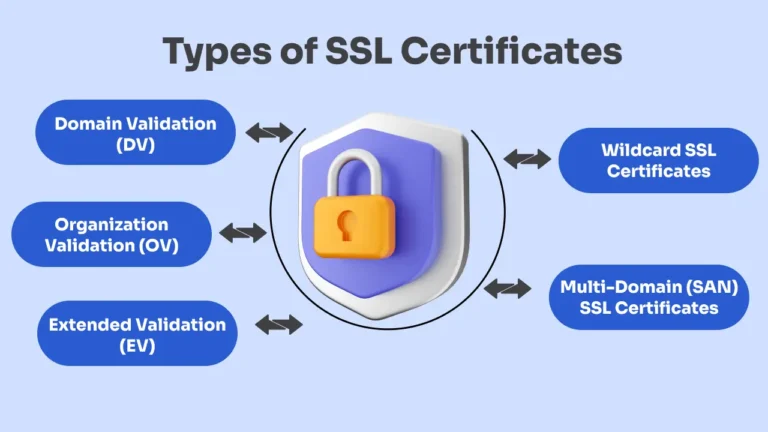
Not all SSL certificates are the same. They all do the basic job of securing data, but the difference lies in how much trust and validation they provide. Think of it like ID cards—some just prove you exist, while others prove your entire background and identity.

Here are the main types you’ll come across:

  1. Domain Validation (DV)
    • Easiest and fastest to get.
    • The certificate authority (CA) only checks if you own the domain.
    • Great for personal blogs, portfolios, or small websites.
    • Example: if you just want the padlock symbol and HTTPS, this works fine.
  2. Organization Validation (OV)
    • A step up in trust. CA not only checks your domain ownership but also verifies your business details (like your name and address).
    • Best suited for business websites where visitors need extra confidence.
    • Visitors can see your organization name in the certificate details.
  3. Extended Validation (EV)
    • The highest level of verification.
    • The CA runs a full background check on your business—legal, physical, and operational.
    • Traditionally, EV certificates would show the company’s name in the browser bar (some browsers still highlight this).
    • Ideal for e-commerce, banks, or large organizations where trust is critical.
  4. Wildcard SSL Certificates
    • Covers a main domain plus all its subdomains.
    • Example: if you have example.com, a wildcard SSL will also protect shop.example.com, blog.example.com, etc.
    • Saves money if you run multiple subdomains.
  5. Multi-Domain (SAN) SSL Certificates
    • Let’s you secure multiple different domains with one certificate.
    • Handy for businesses managing several websites under one umbrella.

So the type of SSL certificate you need depends on your website’s purpose. If you’re running a personal site, DV is enough. But if you’re handling money, sensitive data, or operating a big brand, OV or EV gives visitors that extra peace of mind.

How to Get an SSL Certificate for Your Website?

The good news is: getting an SSL certificate today is way easier than it used to be. A few years back, you had to buy one separately, manually install it, and wrestle with server settings. Now? Many hosting providers give you SSL for free (Hostinger), and the setup is often just a click.

Here are the main ways you can get one:

  1. Through Your Hosting Provider
    • Most web hosts (like Bluehost, Hostinger, SiteGround, GoDaddy, etc.) include a free SSL in their plans.
    • Usually, it’s powered by Let’s Encrypt, a nonprofit that provides SSL certificates at no cost.
    • Setup is often as simple as turning it on in your hosting dashboard.
  2. Free SSL (Let’s Encrypt)
    • If your host doesn’t provide it automatically, you can still install Let’s Encrypt manually.
    • It renews every 90 days, but many hosts auto-renew it for you, so you don’t need to worry.
    • Perfect for bloggers, small businesses, or anyone on a budget.
  3. Paid SSL Certificates
    • If you need advanced validation (OV or EV) or want to secure multiple domains/subdomains, you’ll need a paid SSL.
    • These come with extra features like a higher warranty, company validation, and trust seals.
    • Prices can range from a few dollars per year to several hundred, depending on the level of validation.
  4. From a Third-Party SSL Vendor
    • You can also buy SSL certificates from companies like DigiCert, GlobalSign, or Sectigo.
    • This is often the route for bigger businesses that need maximum credibility and stronger customer assurance.

Steps to set it up:

  1. Log in to your hosting control panel.
  2. Find the “SSL/TLS” or “Security” section.
  3. Enable the free SSL or install the certificate you purchased.
  4. Update your website to use HTTPS (many hosts do this automatically).
  5. Test your site in the browser—look for the padlock symbol.

After installing, make sure all your pages redirect from http:// to https://. If some images or scripts still load via HTTP, you’ll get a “mixed content” warning. Tools like Why No Padlock can help you find and fix those.

So bottom line: getting an SSL certificate is no longer complicated or expensive. For most websites, a free Let’s Encrypt SSL from your host will do the job. But if you run a business that handles sensitive transactions, investing in a paid certificate with extra validation is worth it.

Also Read: What is a Domain and Hosting in Web Development? A Beginner’s Guide
How to Know if a Website Has SSL?

How to Know if a Website Has SSL?

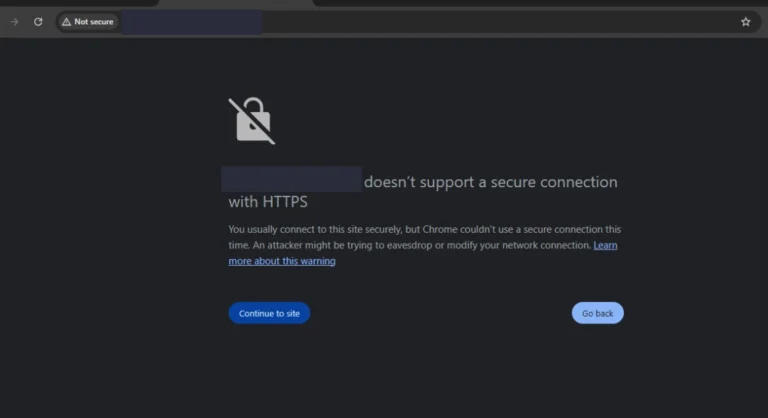
The quickest way to check if a site has SSL is to look at the browser’s address bar. If you see a small padlock icon and the URL starts with https:// instead of just http://, it means the website is secured with SSL. On the other hand, if you spot a “Not Secure” warning or no padlock at all, that’s a clear sign the site doesn’t have proper SSL protection.

SSL Certificate vs Other Website Security Measures

SSL Certificate vs Other Website Security Measures

Here’s the thing: an SSL certificate is powerful, but it’s not a magic shield that makes your entire website invincible. It solves a very specific problem—encrypting the connection between the visitor’s browser and your server—but there are other areas of security it doesn’t cover.

Think of it this way: SSL is like the lock on your house’s front door. It keeps intruders from easily walking in. But what about the windows, the back door, or someone trying to sneak in through the roof? That’s where other security measures come into play.

Let’s break it down:

  1. SSL Certificate (Encryption & Trust)
    • Secures data while it’s traveling between a visitor and your site.
    • Protects sensitive info like passwords, credit card numbers, and personal details.
    • Shows visitors your site is legitimate (the padlock + HTTPS).
    • But… it doesn’t stop hackers from attacking your server directly.
  2. Firewalls
    • Act as a barrier between your website and the outside world.
    • They filter out suspicious traffic, block brute-force login attempts, and protect against common attacks like SQL injection.
    • Without a firewall, even a site with SSL can be vulnerable.
  3. Malware Scanning & Removal
    • SSL doesn’t clean up viruses or malicious code on your site.
    • Malware scanners regularly check your site for infections, hidden links, or scripts that hackers inject.
    • Essential if you’re running WordPress or any CMS.
  4. Backups
    • SSL won’t save you if your site crashes or gets hacked.
    • Regular backups ensure you can restore your site quickly if something goes wrong.
  5. Updates & Strong Passwords
    • Simple but crucial. Keeping your website software (WordPress, plugins, themes) updated and using secure logins prevents a lot of attacks. SSL doesn’t cover this at all.

So, while an SSL certificate is vital, it’s really just the first layer of security. It makes your website trustworthy, encrypts data, and helps with SEO—but on its own, it’s not enough.

A truly secure site combines SSL plus firewalls, malware protection, strong authentication, and backups. Just like protecting your house, you don’t rely only on the front-door lock—you add alarms, cameras, and maybe even a guard dog for complete peace of mind.

Conclusion

To sum it all up, here’s why an SSL certificate is a must for every website:

  1. Keeps data private – It encrypts sensitive information like passwords, payments, and personal details.
  2. Builds instant trust – That little padlock and HTTPS signal tell visitors they’re safe on your site.
  3. Boosts SEO – Google prefers secure websites, giving you a ranking advantage.
  4. Protects your reputation – A “Not Secure” warning scares visitors away, while SSL makes you look professional.
  5. Easy and often free – Most hosting providers include SSL at no extra cost, so there’s really no excuse not to have it.

In short: SSL is no longer optional. It’s the digital lock your website needs to stay secure, credible, and search-friendly. If you haven’t set it up yet, now’s the time.

Share it with Friends